Overview
The purpose of this tutorial is to guide newcomers through the complete Nucleus technology stack and supporting workflows.
At the end of this tutorial you will have used the Protocols in the Distribution to assemble Base Cytosol, characterized its performance using the Cell Development Kit (CDK) on Nucleus Hub, and finally posted a Developer Note (DevNote) that reports on its performance.
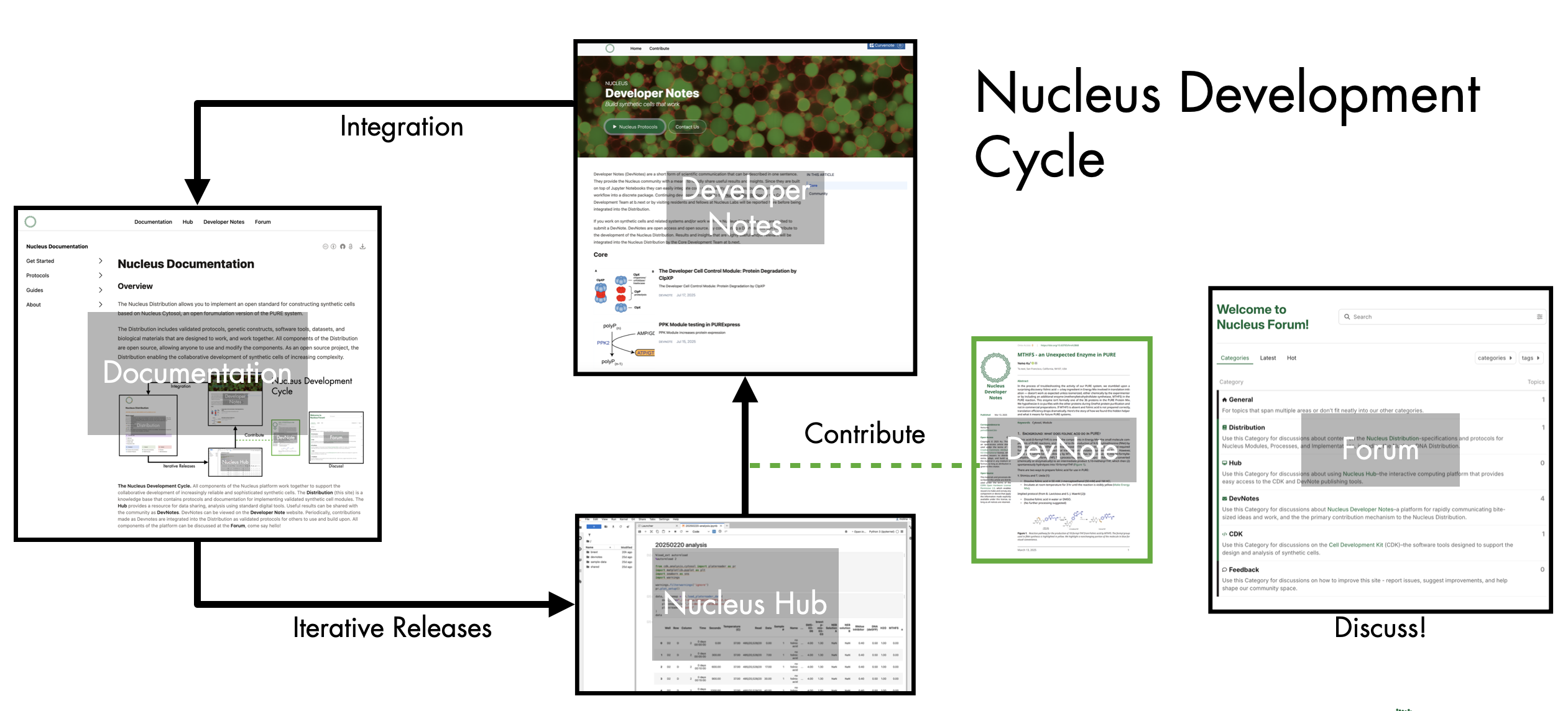
The Nucleus Development Cycle. All components of the Nucleus platform work together to support the collaborative development of increasingly reliable and sophisticated synthetic cells contained within the Distribution. The Documentation (this site) is a knowledge base that contains protocols and documentation for implementing validated synthetic cell modules. The Hub provides a resource for data sharing and analysis using standard digital tools. Useful results can be shared with the community as DevNotes. DevNotes can be viewed on the Developer Note website. Periodically, contributions made as Devnotes are integrated into the Distribution as validated protocols for others to use and build upon. All components of the platform can be discussed at the Forum, come say hello!
This tutorial assumes that you have the necessary components of Base Cytosol: small molecule mix, tRNA, protein mix, ribosomes, and a suitable reporter plasmid such as pOpen-deGFP. The components of Base Cytosol can be obtained in two ways: you can make them yourself from scratch, or you can acquire a premade reagent kit from b.next.
If you are looking to get started quickly, we recommend acquiring a kit from b.next. If you prefer more control over the cytosolic system, the Distribution contains materials, protocols, and documentation for making your own components from scratch.
Using the Distribution as a knowledge base
The Distribution contains useful documentation organized across four different categories:
Modules include specification pages for functional biological modules (see Nucleus Cytosol as an example).
Processes describe validated lab protocols that either help you implement modules or just generally do useful things (see Assemble Protein Mix as an example).
Implementations describe particular uses of Modules in a specific context and using specific Processes (see Responder: aTc -> ivhsl as an example).
Guides are narrative documentation describing how to do something generally useful (this page is a guide, for instance). We recommend exploring the four document categories to get a sense for how this site is organized.
Now that we’re more oriented in the documentation let’s navigate to the protocol we’d like to execute:
If you follow the steps on that page, you should find yourself with some data in hand ready to be analyzed. Rather than firing up Excel or opening a Google Sheet, we’re going to sign into Nucleus Hub.
Analyzing Data with Nucleus Hub
Nucleus Hub is an interactive computing platform built on JupyterHub. Software tools are essential for getting work done and sharing results. Nucleus Hub provides a way of accessing software tools that just work. No installs, no compiling, no environmental management. Of course, if you want to modify your own environments and build code, that’s supported as well. The Nucleus CDK lives on GitHub, but the Hub is preconfigured to get you up and running without any additional work. And there’s templates.
Documentation for Nucleus Hub can be found in Guides. Guides is the place to find tutorials and how-tos that walk you through different aspects of the documentation. This page is an example of a tutorial. We recommend exploring the Guides pages to get a sense for how the documentation is organized.
You will find a Guide for getting started with Nucleus Hub. Be sure to take a look at that page and familiarize yourself with the platform.
Now that you are set up and familiar with Nucleus Hub, we can use the CDK tools to analyze data in Nucleus Hub. You will find a guide for that as well:
After working through these tutorials, you’ll have a Nucleus Hub account and a visualization of your data. Consider documenting your work by writing a DevNote to share with the Nucleus community.
Sharing your results as a Developer Note
Nucleus is an open platform that let’s everyone to build together. DevNotes are the key way to contribute to the Nucleus Distribution. DevNotes are conveniently built on top of Jupyter Notebooks and MyST Markdown (a flavor of Markdown designed for technical communication). Since your analysis was done in a Jupyter Notebook, your work can be easily integrated into a DevNote since they make use of compatible file formats.
If you followed the steps on that page, you should have successfully posted a DevNote.
Engage with the community on the Nucleus Forum
Once a DevNote goes live, a thread will be opened on the Forum for others to discuss. People might ask you how to replicate what you did, tell you that you made an incredible mistake, or just say “hi”. These “Hello, World!” DevNotes go into a special channel and provide a place for people to introduce themselves.
What’s next?
You are now in command of a growing collection of validated Modules that you can build on top of and are equipped with the tools to analyze and share what you build. If you develop something useful, you should keep in mind the Nucleus Contribution Standards so that your work can be documented for reuse and shared in the Distribution.
We look forward to hearing from you!